Appreise Ledger: Books You Keep Yourself, in Plain Text
The oldest writing we have is mostly bookkeeping. The clay tablets from Uruk, in ancient Sumer, date from about 3400 to 3000 BC, and most of them are accounts: barley, beer, livestock and workers. The oldest name of a person we can read is often said to be “Kushim”, written on tablets that record barley. Whoever Kushim was, the job was keeping the books.
Double entry is younger, but not by much on that scale. The oldest surviving double-entry ledger was kept in 1299 and 1300 for a Florentine company’s branch in Provence. Luca Pacioli printed the method in 1494, and called it “the method of Venice”.
So a ledger is a very old and well tested idea. I built my books on it: Appreise Ledger. It runs our own books today, and it is in closed testing for others.
Why I built it
I have invested in real estate for a long time, and I have run into every problem in the book, and a few that aren’t in it. If you are curious, I wrote them up in Our Adventures in Real Estate. I also keep the books for our rentals and our companies myself. For years I used Tiller, which feeds bank transactions into a spreadsheet. It worked well, and it was cheap next to paying for QuickBooks seats. But it fell short in four ways that mattered to me.
- Single entry. Tiller gives you one list of transactions. When an import goes wrong, nothing tells you, and finding the bad line is up to you.
- No real estate support. Purchases, loans, depreciation and the value of each property were mine to model by hand.
- No help with taxes. Getting from the transactions to the lines on a return was a separate project every year.
- No investor support. When a bank asked for a personal financial statement, I had to build one myself.
QuickBooks was no answer either. It can do everything, and it is complicated to match. It is built to make an accountant’s work faster, not to let you do without one. And imports, in every tool I tried, were only partly automatic: a feed brings in most of the lines, then quietly skips some.
What pushed me over the edge was the 2025 tax season. Reconciling a year of books for the returns was a horrific experience: a year of transactions to untangle at once, under a deadline, against forms that want the numbers cut a different way than the books keep them.
I wanted books that I could keep myself, all year, so that tax time is only a matter of reading the numbers off. Here is what I ended up with.
Beancount, and what it leaves out
The idea is not mine. Beancount, which Martin Blais started in 2008, keeps double-entry books as plain text, and it has a following among people who like their tools simple and their data in the open. I liked the idea immediately.
But a ledger is only one piece of keeping books. The others are where the time goes:
- Import. Getting every line from every bank, card and broker into the books, without skipping or doubling any.
- Reconciliation. Matching the books to each statement quickly, and finding the line that is off when they don’t match.
- Reports. Turning the books into the few numbers you actually need.
On reports, I found that I want only a handful: the balance sheet, the income statement, the cash flow, the real estate summary, the tax lines and the personal financial statement. I don’t need a full-featured reporting engine that can slice the books any way at all. I need those few reports to be right, and to be there whenever I ask.
So Appreise Ledger starts from Beancount’s idea and adds the missing pieces around it.
- The format. Your books are Beancount files, a long-established open plain-text format. Nothing in them is specific to Appreise.
- The engine. rustledger, an open-source reimplementation of Beancount in Rust, checks the books and adds them up: every transaction balances, every balance check against a statement holds. Nothing is saved unless that check passes.
- Everything around it. Appreise’s own code, also in Rust, does the rest: bank connections through Plaid, the statement readers, matching transfers between your companies, splitting loan payments, depreciation, the reports, and keeping the files in git.
It is a notebook
Appreise Ledger keeps your books as plain text. There is no cryptic database: every account, every transaction and every note is a line of text that you can open and read in any editor. In effect it is a notebook, written in a strict format so that a computer can add it up.
Those files live in a git repository that you own, on GitHub or hosted by Appreise, downloadable as a zip and movable to GitHub later. Every change is checked before it is saved, and every change is kept, so the history of your books is there to read, change by change.
Two things follow from that.
- Your data stays yours. If you get angry with us, take your files and go elsewhere. Nothing is locked in a format only we can read.
- It works forever. A plain text file written decades ago still opens today, and yours will open decades from now, whether or not Appreise is still around.
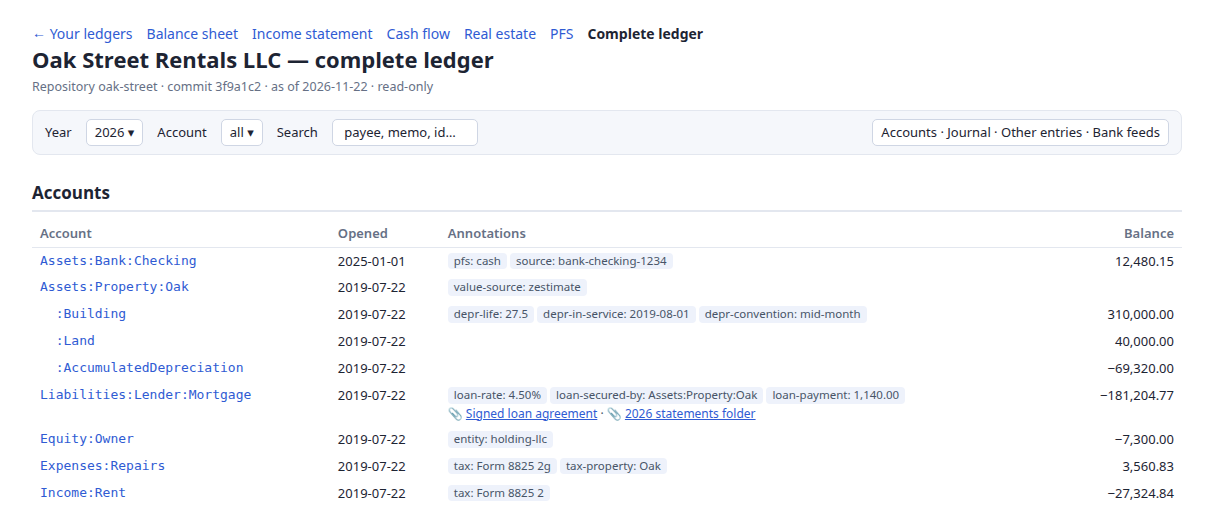
A mockup with made-up data: the complete-ledger page for a fictional company, with every account, its notes and its balance.
Double entry: mistakes show up
Every transaction in double entry touches at least two accounts, and the two sides must add up to zero. Money leaves the checking account and arrives in repairs. A loan payment splits into principal and interest, and the split must add up to what left the bank.
That is not bureaucracy. It is what makes mistakes visible. If an import drops a line or books one twice, an account stops matching the bank’s statement, and a balance check says which account and as of which day. You find the mistake in seconds, not in an afternoon of scrolling.
Imports, solved
Ledger reads these on its own, checks them and puts the new lines in an inbox to book:
- bank, card and brokerage feeds through Plaid, fetched every day;
- a bank’s CSV or OFX download;
- exports from Stessa, Buildium, RentRedi and AppFolio;
- investment history: buys, sells, dividends, reinvestments and splits;
- payslips.
Where there is no export at all, the AI app you use with Ledger reads the PDF or the web page instead. It writes the lines down, checks them against the document’s own totals, and marks them as transcribed, next to the original file. You look them over before they are booked.
Real estate, for the whole life of a property
A property is not one transaction, and Ledger follows it from the purchase to the sale.
- The closing. Hand your AI app the closing statement. It books the purchase (price, loan, credits and closing costs), matches the net to the actual wire, and keeps the PDF with your books.
- Basis and depreciation. You split the cost into land and building, from the county assessor or an appraisal, and Ledger keeps the depreciation schedule, such as 27.5 years for a residential rental.
- Loans. Once you give the loan’s rate and escrow, each payment splits into principal, interest and escrow, and each loan is tied to the property that secures it.
- Value. You record what the property is worth, with the source, an appraisal or a Zestimate, and the equity follows.
Taxes, all year
Ledger does not compute what you will owe, and it does not file returns. What it does is better for keeping your own books: at any time of the year, it shows this year’s taxable income and expenses line by line, as they will appear on your return. That means Schedule E for each property, Form 8825 for a partnership or S corporation, and Schedule C, each split per owner. It also shows realized gains on investments and the depreciation booked so far.
Those are the numbers you, or your preparer, need to estimate what you owe. In spring they are already there.
A personal financial statement that is always current
If you invest actively, sooner or later a bank asks for a personal financial statement. Ledger keeps one current, in the layout banks ask for.
- Your share of each company is valued at its net worth.
- Each property is listed with its value and its source, next to the loan that it secures.
- Stocks and funds are listed at the latest price recorded for them, or at cost until a price exists.
It has a printable page, for when the bank asks.
How you use it
You work with Ledger through an AI app, such as Claude, connected over the Model Context Protocol (MCP). The AI app reads and changes your books only through Ledger’s own tools. You can say “book last month’s statement” or “split this payment between the two properties” instead of clicking through forms. The web pages are there to read your books: the balance sheet, income statement, cash flow, holdings, real estate, the personal financial statement, and the complete ledger with every account and entry.
Where it stands
Does it work? I imported our entire bookkeeping history into it, for everything we own, and I am satisfied with the results.
Appreise Ledger is in closed testing, and there is no open sign-up yet. If you invest in real estate and do your own books, or you simply want good books, and you are comfortable with a bit of technology, let me know if you are interested in trying it.
As always, this is what worked for us, not legal, tax, or investment advice.